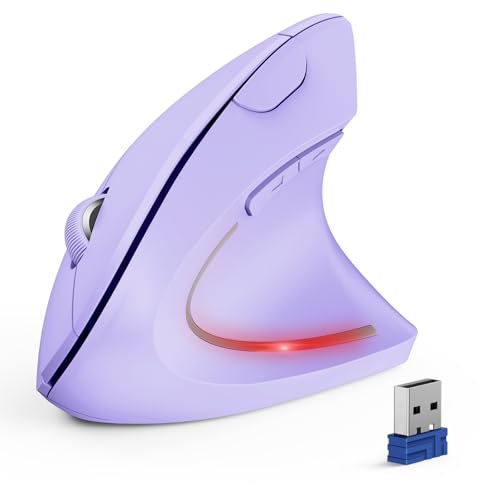
TECKNET Ergonomic Wireless Mouse
Usually $24.49
Price at time of publishing · updated 11m ago
That nagging wrist pain from long computer sessions might just disappear with this vertical mouse.
Verified by Agora · Price and availability shown are accurate as of the date/time indicated and are subject to change. Any price information displayed at the time of purchase on Amazon will apply. As an Amazon Associate, Agora earns from qualifying purchases.
What we've verified about this price
Our read on this product
If you spend hours at your computer, you've probably felt that familiar ache in your wrist. This vertical mouse is designed to combat that by putting your hand in a more natural, handshake-like position, which can significantly reduce strain over long work sessions. It’s a practical upgrade that makes a noticeable difference in daily comfort, especially if you’re working from home or in a busy office.
Beyond just comfort, this mouse offers solid functionality for a multi-device setup. Seamlessly switching between your laptop, a secondary computer, or even a tablet via Bluetooth or the 2.4GHz dongle means fewer ports used and less hassle. The adjustable DPI also means you can fine-tune the cursor speed for different tasks, whether you're precise design work or just browsing the web.
What makes it stand out
- Its vertical, handshake-like grip offers a distinct ergonomic advantage over standard flat mice, reducing pronation.
- Seamlessly switches between up to three devices (Bluetooth and 2.4GHz) without needing to re-pair constantly.
- Offers adjustable DPI up to 4800, allowing for more precise cursor control than many basic wireless mice.
When this isn't the right fit
- Mac users will find the side buttons don't function as expected.
- If you're looking for a mouse for left-handed use, this design won't work for you.
Real-world notes
- The silent clicks are genuinely appreciated in shared workspaces or quiet home environments.
- Switching between devices is quick and intuitive, a real convenience for multi-computer users.
- The higher DPI settings are useful for detailed work, though most users might stick to the lower defaults.
Consider this if you're looking to alleviate wrist discomfort and streamline your multi-device workflow.
Where you'll also find this pick
Explore the collections and guides where this product appears.