Samsung Galaxy Tab S9 FE S Pen
Usually $39.95
Price checked 49m ago
Moving from finger navigation to a dedicated stylus turns your tablet from a consumption device into a genuine tool for creation and organization.
Verified by Agora · Product prices and availability are accurate as of the date/time indicated and are subject to change. Any price and availability information displayed on Amazon at the time of purchase will apply to the purchase of this product. As an Amazon Associate, Agora earns from qualifying purchases.Price checked 49m ago
Verified History
What we've verified about this price
Our read on this product
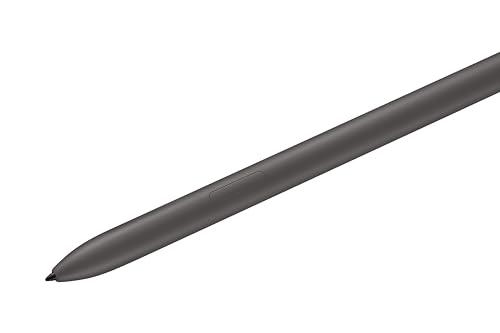
Navigating a tablet with your finger is fine for scrolling, but it quickly becomes a barrier when you are trying to sketch or mark up a document. This stylus bridges that gap by acting as a natural extension of your hand, providing the pressure sensitivity and precision that a touchscreen simply cannot replicate on its own. It feels like a standard pen, which makes the transition from physical notebooks to digital ones feel surprisingly intuitive.
The integration with the tablet's software is what sets it apart from generic alternatives. Because it is designed specifically for the Galaxy Tab S9 FE, the button on the side actually triggers useful shortcuts like Air Command rather than just acting as a generic input. It is also one of the few styluses that can handle being near water, which gives you peace of mind if you are working in a space where spills or rain are a realistic concern.
What makes it stand out
- IP68 water resistance provides durability that is almost non-existent in competing tablet styluses.
- Native integration with Air Command allows for system-level controls that third-party styluses cannot trigger.
- Pressure sensitivity is calibrated specifically for the Galaxy Tab S9 FE screen, avoiding the jitter or lag often found in universal pens.
When this isn't the right fit
- You are looking for a universal stylus to use across multiple brands or non-Samsung devices.
- You rarely use your tablet for writing, drawing, or precise annotation.
Real-world notes
- The magnetic attachment is strong enough to keep the pen secure while you move around.
- The button shortcuts become second nature once you map them to your most frequent tasks.
- It requires no pairing or charging to function, which removes the friction of managing another battery-powered accessory.
Pick this up if you want the full, intended experience of your tablet, as generic styluses will leave you missing out on the pressure sensitivity and software integration.
Where you'll also find this pick
Explore the collections and guides where this product appears.