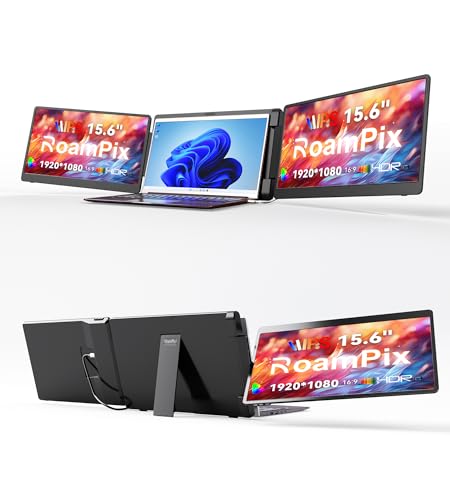
RoamPix 15.6" Triple Laptop Screen Extender
Usually $239.49
Price at time of publishing · updated 25m ago
Transform your laptop into a multi-screen workstation wherever you are.
Verified by Agora · Price and availability shown are accurate as of the date/time indicated and are subject to change. Any price information displayed at the time of purchase on Amazon will apply. As an Amazon Associate, Agora earns from qualifying purchases.
Near 90-Day Low
What we've verified about this price
Our read on this product
This triple monitor setup is designed to fundamentally change how you work on the go, essentially giving you a portable command center. The real magic happens when you're juggling multiple applications – think coding with reference material open, or editing a video while keeping your project files and timeline visible. It’s about reducing that constant window-switching fatigue that eats into your focus. The setup is straightforward, aiming for a plug-and-play experience so you're not bogged down by complex installations when you're trying to be productive.
What sets this apart is the thoughtful design for collaboration. The left screen's ability to rotate 360 degrees means you can easily turn it to face a colleague or client during a meeting, sharing your screen without awkward angling or having to physically turn your entire laptop. It transforms your portable setup from a personal productivity tool into a more interactive presentation device when needed. While it's built for portability, the quality of the IPS screens means you're not sacrificing visual clarity for the convenience.
What makes it stand out
- Offers a unique 360° rotatable screen for easier collaboration and presentations, unlike standard dual-screen extenders.
- Provides a true triple-monitor setup that significantly expands your workspace, whereas most alternatives offer only a single additional screen.
- Features a plug-and-play setup requiring minimal driver installation, simplifying the process compared to some other portable display solutions.
When this isn't the right fit
- Not compatible with M1/M2/M3 chips unless they have a Pro/Max designation.
Real-world notes
- The physical size and weight will add bulk to your mobile setup.
- Adjusting the brightness on each individual screen is a necessary step for optimal viewing.
Consider this if you're frequently working with multiple applications and need to extend your laptop's screen real estate for enhanced productivity, especially when away from a traditional desk setup.
Where you'll also find this pick
Explore the collections and guides where this product appears.
How this price compares over time
Not enough tracked price history yet.