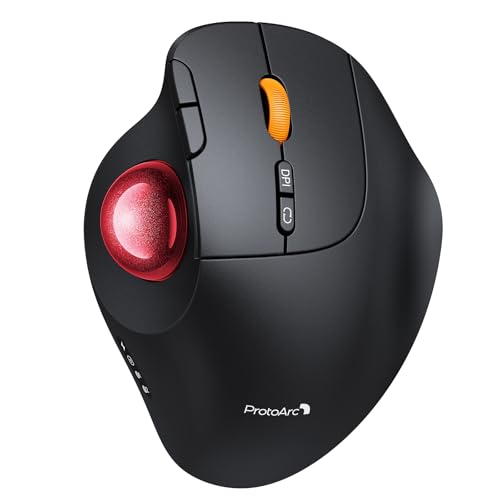
ProtoArc EM02 Wireless Trackball Mouse
Usually $40.99
Price at time of publishing · updated 2m ago
Tired of wrist pain? This trackball mouse lets you find your most comfortable angle for all-day computing.
Verified by Agora · Price and availability shown are accurate as of the date/time indicated and are subject to change. Any price information displayed at the time of purchase on Amazon will apply. As an Amazon Associate, Agora earns from qualifying purchases.
What we've verified about this price
Our read on this product
If you're battling wrist and arm fatigue from a traditional mouse, this trackball could genuinely change your workday. Its adjustable tilt angle is the standout feature, letting you dial in a more natural hand position that traditional mice just can't offer. It's also about keeping your workflow smooth and pain-free.
The precision of the trackball itself means you can navigate complex interfaces or tight spaces without the large movements a standard mouse requires, which is a significant benefit if your desk real estate is limited. Plus, the ability to switch between multiple devices with a single button adds a layer of workflow efficiency that's hard to overlook for anyone juggling a laptop and a desktop.
What makes it stand out
- Offers an adjustable tilt angle, unlike most fixed-position trackballs.
- Allows seamless switching between multiple devices, a feature not common on many ergonomic mice.
- Features quiet-click buttons, which are often absent on more performance-oriented trackballs.
When this isn't the right fit
- You're accustomed to a standard mouse and aren't prepared for a learning curve.
- You need mouse buttons that are fully compatible with macOS (forward/backward buttons have limitations).
Real-world notes
- The quiet clicks are a welcome change for shared workspaces or late-night sessions.
- Finding the perfect tilt angle might take a little experimentation, but it's worth the effort for personalized comfort.
- The battery life is impressive, meaning you won't be constantly searching for a charger.
This is a confident pick for anyone prioritizing ergonomic comfort and precise control in their daily computer use.
Key specs at a glance
- Feature
- ergonomic design
- Feature
- rechargeable battery
- Feature
- wireless connectivity
- Power
- rechargeable battery
Where you'll also find this pick
Explore the collections and guides where this product appears.