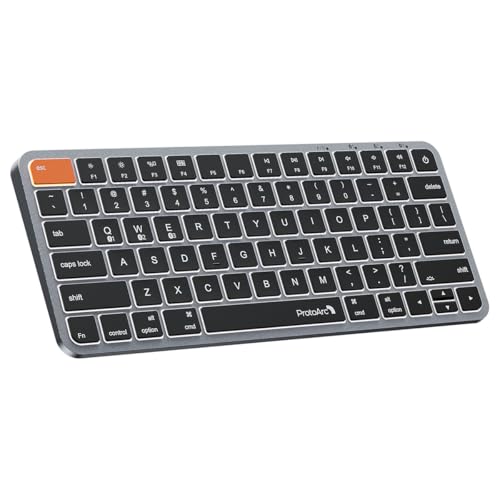
ProtoArc Bluetooth Keyboard
Usually $40.49
Price at time of publishing · updated 5m ago
Tired of awkward typing on your iPad or MacBook when you're away from your desk?
Verified by Agora · Price and availability shown are accurate as of the date/time indicated and are subject to change. Any price information displayed at the time of purchase on Amazon will apply. As an Amazon Associate, Agora earns from qualifying purchases.
Near 90-Day Low
What we've verified about this price
Our read on this product
This keyboard is built from the ground up for Mac users, which means the keys you use most often, like Command, are actually larger than usual. That might sound minor, but when you're constantly copying, pasting, or switching apps, you'll notice fewer accidental mis-hits. It’s also designed to look and feel at home next to your MacBook or iMac, with a slim profile and a metallic finish that avoids the plasticky feel of many portable keyboards.
The backlighting is a subtle but genuinely useful touch, especially if you ever find yourself working in a dimly lit office or on a red-eye flight. It has three brightness levels, so you can dial it in without being distracting. Plus, the ability to quickly switch between up to three devices means you can easily hop from typing on your iPad to your MacBook without fiddling with Bluetooth settings, which is a real time-saver if you juggle multiple Apple devices throughout the day.
What makes it stand out
- Features larger Command keys, which are specifically designed to reduce errors during common Mac shortcuts like copy/paste.
- Offers customizable white LED backlighting, a feature often omitted on more generic portable keyboards.
- Seamlessly switches between up to three paired Bluetooth devices with a dedicated button, unlike many keyboards that require re-pairing.
When this isn't the right fit
- If you regularly work with Windows or Linux machines, this keyboard's specialized Mac layout will likely cause more frustration than convenience.
- Anyone who needs a dedicated number pad for frequent financial or data entry tasks will find this compact layout limiting.
Real-world notes
- The low-profile scissor switches provide a satisfying tactile feel without being overly loud, making it suitable for shared spaces.
- You'll need to manually reactivate the backlighting after the keyboard goes to sleep, which is a small extra step to remember.
This is a confident pick for Mac and iPad users who want a dedicated, comfortable wireless typing experience that complements their existing setup.
Where you'll also find this pick
Explore the collections and guides where this product appears.
How this price compares over time
Not enough tracked price history yet.