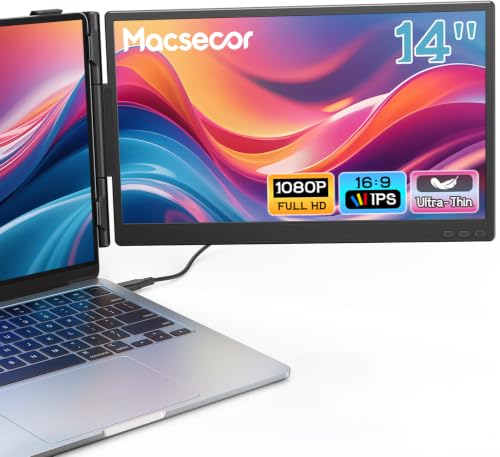
Macsecor Laptop Screen Extender
Usually $119.98
Price checked 50m ago
Expanding your digital workspace while on the move feels less like a chore when the extra screen folds neatly against your laptop.
Verified by Agora · Price and availability shown are accurate as of the date/time indicated and are subject to change. Any price information displayed at the time of purchase on Amazon will apply. As an Amazon Associate, Agora earns from qualifying purchases.
Near 90-Day Low
What we've verified about this price
Our read on this product
You stop feeling like you are constantly toggling between windows once you have this attached. It effectively turns a cramped laptop screen into a proper workstation, allowing you to keep your primary task on one side and reference materials or communication apps on the other without shrinking your working area. The physical setup is designed to be tucked away, meaning it does not add the kind of bulk that makes you regret bringing it along for a trip.
Because it connects via standard ports, you are not dealing with complex software installations or proprietary driver headaches. You will notice the difference most when you are working from a small hotel desk or a coffee shop table where space is at a premium, as the folding mechanism allows you to swing the screen around to show someone else your work or tuck it behind the laptop when you need to pack up quickly.
What makes it stand out
- The 225-degree rotation range provides more physical flexibility for sharing your screen than fixed-angle alternatives.
- The concealed, sliding support structure minimizes the footprint on your laptop lid compared to bulkier, clip-on designs.
When this isn't the right fit
- You primarily use a smaller laptop under 13 inches or a tablet as your main device.
- You are not prepared to manage the occasional extra cable for power if your laptop port does not output enough juice on its own.
Real-world notes
- The sliding arm mechanism feels secure enough to hold the monitor in place without constant readjustment.
- Rotating the screen into portrait mode is genuinely useful for reading long documents or scrolling through code.
- Connecting via a single cable is possible, but having a dedicated power source nearby keeps the display brightness consistent.
Pick this up if you frequently work remotely and find yourself constantly minimizing windows to manage your workflow.
Where you'll also find this pick
Explore the collections and guides where this product appears.

How this price compares over time
Not enough tracked price history yet.