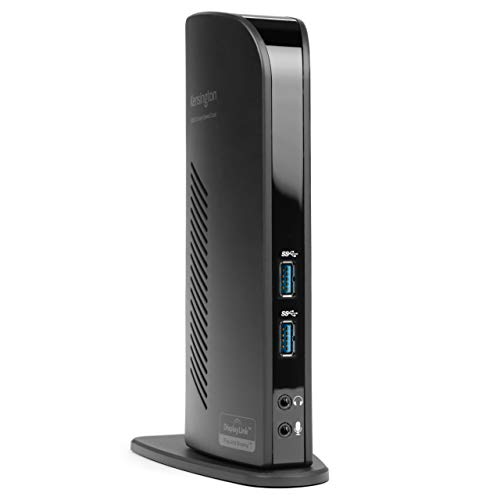
Kensington USB 3.0 Dual Display Docking Station
Usually $67.18
Price checked today at 07:11 CT
Tired of constantly swapping cables to connect your laptop to monitors and peripherals?
Verified by Agora · Price and availability shown are accurate as of the date/time indicated and are subject to change. Any price information displayed at the time of purchase on Amazon will apply. As an Amazon Associate, Agora earns from qualifying purchases.
What we've verified about this price
Our read on this product
This docking station is a straightforward way to declutter your desk and expand your laptop's capabilities, especially if you're working with a machine that has limited ports. It transforms a single USB-A connection into a hub for multiple monitors, peripherals, and network access, which can genuinely streamline your workflow whether you're at home or in the office. The inclusion of adapters for HDMI and DVI also means you're likely to have an easier time connecting to a wider range of displays without needing extra accessories.
While it offers dual display support, it's worth noting that achieving the highest resolutions (like 2560x1600) is typically limited to a single monitor connection. For dual displays, you'll be looking at resolutions up to 2048x1152, which is still perfectly adequate for most productivity tasks but might be a consideration if you specifically need very high resolutions on multiple screens simultaneously. The power supply is for the dock itself, not for charging your laptop, so keep that in mind for your power management needs.
What makes it stand out
- Provides dual display support and extensive peripheral connectivity through a standard USB-A port, making it compatible with a wider range of laptops than many USB-C only docks.
- Includes DVI-to-VGA and DVI-to-HDMI adapters, offering more immediate monitor compatibility out of the box compared to docks that only support DisplayPort or HDMI.
- Offers a Gigabit Ethernet port for stable wired network connections, which is a useful addition for those whose laptops lack a dedicated Ethernet port or have unreliable Wi-Fi.
When this isn't the right fit
- You need to charge your laptop through the docking station.
- You require the absolute highest possible resolutions on multiple displays simultaneously.
Real-world notes
- The convenience of having all peripherals and displays connected via a single USB-A cable is a significant daily win.
- It's a solid solution for expanding connectivity without needing a USB-C port on your laptop, which is becoming less common on older or budget models.
- While it supports dual displays, achieving the highest single-display resolution requires using one of the dedicated outputs.
This makes the most sense when you need to quickly set up a multi-monitor workstation from a laptop with few ports.
Where you'll also find this pick
Explore the collections and guides where this product appears.
How this price compares over time
Not enough tracked price history yet.