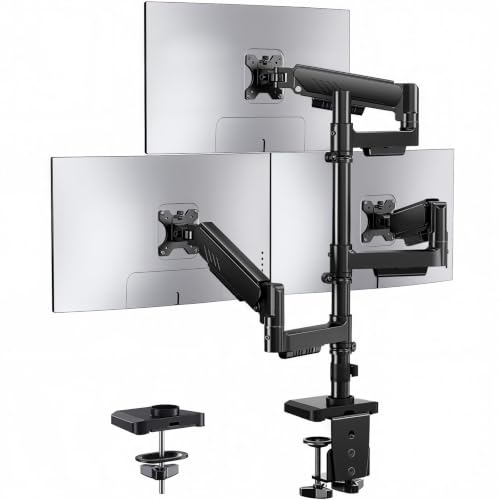
ErGear Triple Monitor Mount
Usually $89.99
Price checked today at 10:10 CT
Moving three bulky monitor bases off your desk surface is the single biggest upgrade for reclaiming your workspace.
Verified by Agora · Product prices and availability are accurate as of the date/time indicated and are subject to change. Any price and availability information displayed on Amazon at the time of purchase will apply to the purchase of this product. As an Amazon Associate, Agora earns from qualifying purchases.Price checked today at 10:10 CT
90-Day Low
What we've verified about this price
Our read on this product
Clearing your desk of three separate monitor stands is the quickest way to make a workspace feel intentional rather than cluttered. By moving the weight off the surface, you gain back the physical area where your keyboard and notepad actually live, which makes a noticeable difference during long sessions of coding or data entry.
The real benefit here is the granular control over each screen. Because the arms move independently, you can angle the side monitors to wrap around your field of vision, creating a more cohesive cockpit feel that fixed stands simply cannot replicate. It stays exactly where you set it, meaning you stop fiddling with alignment once you find your preferred ergonomic height.
What makes it stand out
- Independent arm movement allows for a wrap-around configuration that is difficult to achieve with fixed-bar triple mounts.
- The dual C-clamp base design provides a wider contact area than single-bolt mounts, which is helpful for keeping heavier monitors stable.
When this isn't the right fit
- Your desk is made of glass or has a thick frame that prevents a C-clamp or grommet mount from securing properly.
- You plan on frequently changing monitor sizes, as re-balancing the tension on three separate arms can become tedious.
- You prefer a perfectly flush, side-by-side alignment that never shifts, as individual arms can sometimes require minor tweaks to stay perfectly level.
Real-world notes
- The base footprint is surprisingly small, which helps if you have limited space behind your desk.
- Cable management channels are built into the arms, which keeps the visual clutter down once you have everything routed.
- It takes a bit of time to get the initial tension set correctly, but once adjusted, the arms hold their position reliably.
Makes the most sense when you are ready to stop fighting for desk space and want a single, stable anchor for a multi-screen workflow.
Where you'll also find this pick
Explore the collections and guides where this product appears.