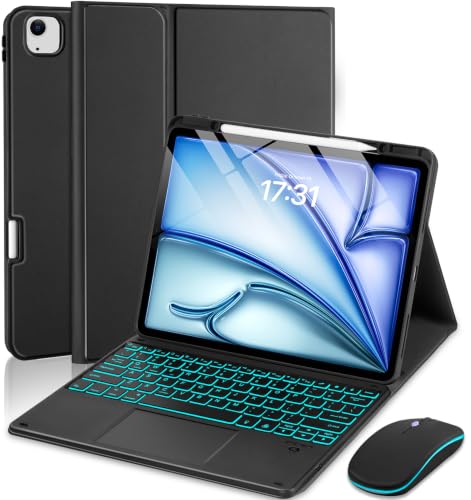
EAMPANG Case Trackpad Keyboard Mouse
Usually $36.99
Price checked Aug 21, 22:45 CT
Transform your iPad into a more capable workstation with this integrated keyboard and trackpad case.
Verified by Agora · Price and availability shown are accurate as of the date/time indicated and are subject to change. Any price information displayed at the time of purchase on Amazon will apply. As an Amazon Associate, Agora earns from qualifying purchases.
What we've verified about this price
Our read on this product
This case genuinely transforms your iPad into a capable laptop alternative, especially if you find yourself typing more than you expected. The integrated trackpad is surprisingly precise, making navigation feel much more fluid than just using touch. It’s the kind of accessory that quietly makes your device more useful for everyday tasks, not just for occasional use.
The multi-color backlit keyboard is a nice touch, not just for aesthetics, but for actual usability in dimmer environments. You get a good range of adjustable angles, which is crucial for finding a comfortable position whether you're typing a long document or just watching something. It feels like a complete package designed to make your iPad a more versatile tool for work and study.
What makes it stand out
- Offers a precise, multi-finger gesture-supporting trackpad integrated directly into the case, unlike basic keyboard-only attachments.
- Features a 7-color backlit keyboard for improved visibility in various lighting conditions, which many simpler keyboard cases lack.
- Includes a separate, rechargeable 3-DPI wireless mouse for even more granular cursor control, adding another layer of functionality.
When this isn't the right fit
- You only need basic protection for your iPad.
- You prefer the simplicity of a purely touch-based interface.
- You don't anticipate doing much typing or cursor-based work on your iPad.
Real-world notes
- The convenience of having a precise trackpad readily available for navigation.
- How much more comfortable typing becomes compared to the on-screen keyboard.
- The ability to adjust the viewing angle for different tasks like typing, drawing, or watching videos.
Consider this if you're looking to bridge the gap between your tablet and a traditional laptop for productivity.
How this price compares over time
Not enough tracked price history yet.