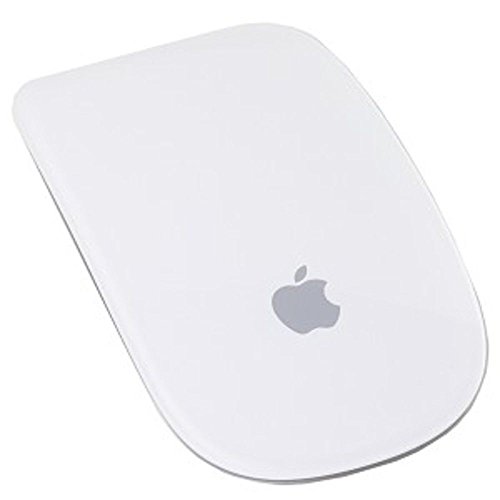
Apple Magic Bluetooth Wireless Laser Mouse
Usually $47.54
Price checked today at 10:10 CT
The gesture surface turns routine Mac navigation into something surprisingly fluid.
Verified by Agora · Price and availability shown are accurate as of the date/time indicated and are subject to change. Any price information displayed at the time of purchase on Amazon will apply. As an Amazon Associate, Agora earns from qualifying purchases.
What we've verified about this price
Our read on this product
The primary appeal here is the gesture control, which feels like a natural extension of using a Mac. Swiping through photos or scrolling web pages with a simple finger movement is genuinely more fluid than using a traditional scroll wheel. It’s designed to feel intuitive, especially if you're already accustomed to gestures on your iPhone or iPad. The mouse itself has a sleek, low profile that looks good on a desk and generally feels comfortable for shorter to moderate use periods.
However, the gesture surface means there are no physical buttons for right- or left-clicks in the traditional sense. While it works well for many tasks, some users find the lack of tactile feedback takes getting used to, and it can sometimes misinterpret gestures, leading to accidental swipes or scrolls. If you rely heavily on distinct physical clicks or find yourself needing to remap buttons for specific software, this might feel like a step back in precision.
What makes it stand out
- Features a touch-sensitive surface for scrolling and gestures, unlike mice with physical scroll wheels.
- Offers seamless integration with macOS gesture commands, enhancing navigation within the Apple ecosystem.
- Has a low-profile, minimalist design that complements Apple hardware.
When this isn't the right fit
- You prefer the distinct tactile feedback of physical mouse buttons for clicking.
- Your workflow heavily relies on remapping mouse buttons for specialized software functions.
- You primarily use your computer for gaming or other precision-intensive tasks.
Real-world notes
- The smooth, buttonless top surface can sometimes lead to accidental gestures.
- Charging involves plugging a cable into the bottom, making it unusable while charging.
- Gesture recognition is best when using macOS and its native applications.
Consider this if your Mac workflow prioritizes gesture-based navigation and you appreciate minimalist Apple design.
Where you'll also find this pick
Explore the collections and guides where this product appears.
How this price compares over time
Not enough tracked price history yet.